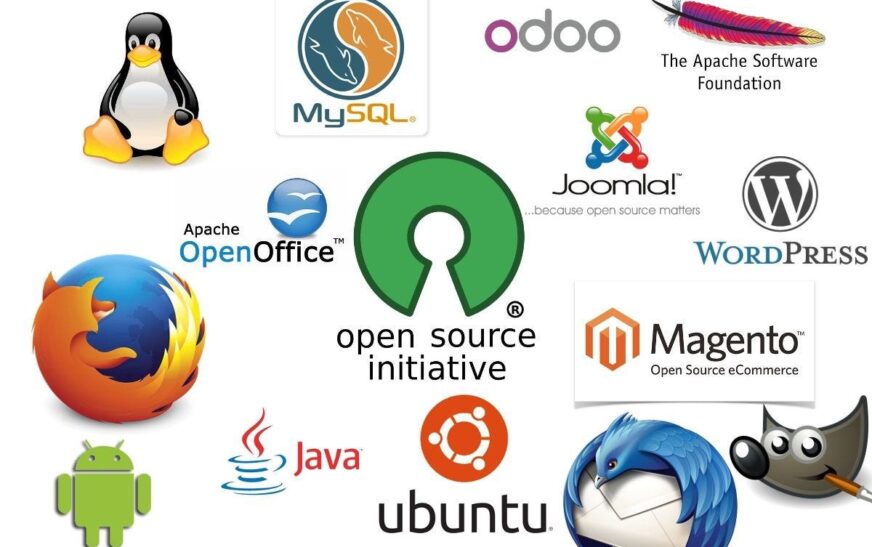
Open source software (OSS) is everywhere—from the apps on your phone to the servers running major websites. But what exactly does “open source” mean, and more importantly, is it safe to use? In simple terms, open source software is any program whose source code is made freely available for anyone to view, modify, and distribute. Unlike proprietary software controlled by a single company, open source projects thrive on transparency and community collaboration. This model has powered innovations like Linux, Firefox, and WordPress—proving that openness doesn’t mean insecurity.
Many people assume that because the code is public, it’s easier for hackers to exploit. But the reality is more nuanced. The very transparency that defines open source also acts as a powerful security mechanism. With thousands of developers reviewing the code, vulnerabilities are often spotted and patched faster than in closed systems. So yes—open source software can be not only safe but sometimes even safer than its proprietary counterparts.
How Open Source Software Works
At its core, open source software operates on a principle of shared ownership and collective improvement. Developers from around the world contribute code, report bugs, suggest features, and test updates—all under open licenses like MIT, GPL, or Apache. These licenses ensure the software remains free to use, modify, and share, fostering innovation without legal restrictions.
Unlike commercial software where updates come from a single vendor, open source projects often evolve rapidly thanks to global collaboration. For example, the Linux kernel—used in Android phones, cloud servers, and supercomputers—is maintained by over 15,000 developers worldwide. This decentralized approach reduces reliance on one company’s roadmap and increases resilience against corporate decisions that might compromise user freedom or security.
Key Characteristics of Open Source Software
- Transparent code: Anyone can inspect the source code for flaws or backdoors.
- Community-driven development: Improvements come from diverse contributors, not just one team.
- Free redistribution: Users can share and install the software without licensing fees.
- No vendor lock-in: You’re not tied to a single provider for support or updates.
Is Open Source Software Really Safe?
This is the million-dollar question—and the answer isn’t black and white. Safety in open source depends on several factors: project maturity, community size, update frequency, and how responsibly users manage their installations. While the open model enables rapid bug detection, it also means you can’t assume every project is equally secure.
Consider this: major corporations like Google, Amazon, and Microsoft rely heavily on open source tools in their infrastructure. If OSS were inherently unsafe, these tech giants wouldn’t trust it with mission-critical systems. In fact, studies show that well-maintained open source projects often have fewer critical vulnerabilities than proprietary alternatives because of rigorous peer review.
Security Advantages of Open Source
- Rapid vulnerability patching: When a flaw is discovered, the community can fix it immediately—no waiting for a vendor’s quarterly update cycle.
- No hidden backdoors: Since the code is public, malicious code inserted by developers is far more likely to be caught.
- Custom security audits: Organizations can review the code themselves or hire third parties to verify its integrity.
- Diverse threat modeling: Global contributors bring different perspectives on potential attack vectors.
Potential Risks to Consider
Of course, open source isn’t immune to risks. Smaller or abandoned projects may lack regular maintenance, leaving known vulnerabilities unpatched. There’s also the danger of “dependency confusion”—where attackers publish malicious packages with names similar to legitimate ones in public repositories like npm or PyPI.
Another concern is supply chain attacks. In 2021, the Log4j vulnerability shocked the tech world, exposing how a single open source library used by millions could become a global security crisis. However, this incident also highlighted the strength of the open source community: within days, patches were released, and mitigation guides spread rapidly across forums and mailing lists.
Real-World Examples: Open Source Done Right
Some of the most trusted technologies in existence are open source. Take Mozilla Firefox, the browser that prioritizes user privacy over ad revenue. Its code is open for scrutiny, and its development is guided by a non-profit foundation committed to an open web.
Then there’s LibreOffice, a free alternative to Microsoft Office. Used by governments, schools, and businesses worldwide, it proves that productivity software doesn’t need to come with a price tag—or hidden data collection.
Even blockchain technology leans heavily on open source principles. Bitcoin’s protocol is fully transparent, allowing anyone to verify transactions and audit the system. This openness builds trust in a decentralized financial network where no single entity holds control.
Best Practices for Using Open Source Safely
Just because software is open source doesn’t mean you should use it blindly. Like any technology, it requires informed decision-making. Here’s how to stay safe while benefiting from the open source ecosystem:
1. Choose Active, Well-Maintained Projects
Look for projects with frequent commits, responsive maintainers, and a clear roadmap. GitHub stars and download counts can be misleading—focus instead on recent activity and issue resolution speed.
2. Monitor Dependencies
Use tools like Dependabot (for GitHub) or Snyk to automatically scan your project’s dependencies for known vulnerabilities. Many CI/CD pipelines now integrate these checks to prevent risky code from reaching production.
3. Apply Updates Promptly
Even if a project is secure today, new threats emerge constantly. Enable automatic security updates where possible, and subscribe to mailing lists or RSS feeds for critical projects you rely on.
4. Contribute Back
If you find a bug or improve a feature, consider submitting a pull request. Supporting the community strengthens the entire ecosystem—and increases the chances that your favorite tools will remain safe and functional long-term.
Open Source vs. Proprietary Software: A Security Showdown
It’s tempting to think proprietary software is safer because it’s “controlled” by a single company. But history tells a different story. Closed systems often hide flaws until it’s too late—remember the Heartbleed bug in OpenSSL? It existed for years before being discovered, despite being used by nearly two-thirds of all websites.
Proprietary vendors may have dedicated security teams, but they also face pressure to release features quickly, sometimes at the expense of thorough code review. Plus, users can’t verify what’s happening under the hood—making them vulnerable to undisclosed data collection or government surveillance requests.
Open source, by contrast, turns security into a team sport. While no system is perfect, the collective vigilance of thousands of eyes makes it significantly harder for serious flaws to go unnoticed for long.
Key Takeaways
- Open source software is defined by publicly accessible code that anyone can use, modify, and share.
- Safety depends on project health—not just the open model itself. Active, well-maintained projects are generally very secure.
- Transparency enables faster bug detection and patching compared to closed-source alternatives.
- Major tech companies and governments rely on open source because of its reliability and auditability.
- Users should prioritize updated, community-supported projects and monitor dependencies carefully.
Frequently Asked Questions
Is open source software free to use?
Yes—most open source software is free to download, use, and modify. However, some companies offer paid support, hosting, or enterprise versions with additional features. The core software remains free under open licenses.
Can hackers exploit open source code more easily?
Not necessarily. While attackers can study the code, so can defenders. The vast majority of security researchers and developers use this transparency to improve security, not weaken it. Well-maintained projects often patch vulnerabilities faster than proprietary ones.
Should small businesses use open source software?
Absolutely. Open source offers cost savings, flexibility, and reduced vendor lock-in. Many small businesses use tools like WordPress, Nextcloud, or Odoo successfully. Just ensure you choose stable, supported projects and keep them updated.
Final Thoughts
Open source software isn’t just a technical choice—it’s a philosophy rooted in freedom, collaboration, and trust. When used wisely, it can be among the safest options available. The key is informed usage: pick reputable projects, stay updated, and engage with the community. In an era where digital privacy and security are under constant threat, open source provides a refreshing alternative—one where transparency isn’t a weakness, but a strength.
So the next time someone asks, “Is open source software safe?” you can confidently say: It can be—and often is—when you choose wisely and stay vigilant.