If you’ve ever felt overwhelmed by scattered notes, forgotten ideas, or digital clutter, you’re not alone. That’s exactly why I love Obsidian. This powerful, local-first knowledge management tool didn’t just organize my thoughts—it transformed how I think, learn, and create. Whether you’re a student, researcher, writer, or lifelong learner, Obsidian offers a unique blend of simplicity, flexibility, and depth that few apps can match. It’s not just another note-taking app; it’s a second brain.
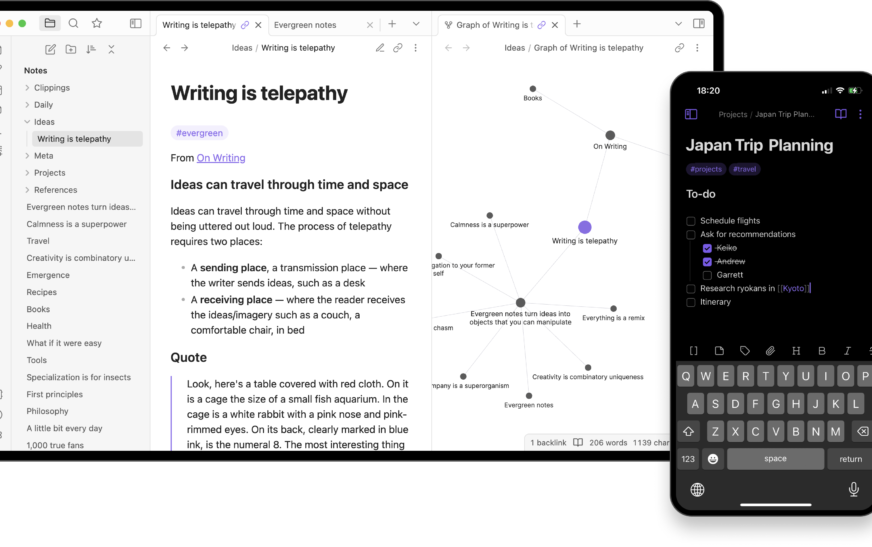
Obsidian stands out because it treats your notes as interconnected ideas, not isolated files. With its graph view, backlinking system, and markdown-based architecture, it encourages deep thinking and meaningful connections. I no longer just write notes—I build a living, evolving knowledge base that grows with me. And the best part? Everything stays on your device. No cloud lock-in, no subscription traps, just pure, private control over your ideas.
What Makes Obsidian So Special?
Obsidian isn’t just about storing information—it’s about making sense of it. Unlike linear note apps like Evernote or Google Keep, Obsidian uses a networked thought approach. Every note is a node, and every link between notes is a relationship. This mirrors how our brains actually work: not in folders, but in associations.
Here’s what sets Obsidian apart:
- Local-first storage: All your notes are saved as plain text files on your device. No reliance on cloud servers, no risk of data loss due to service shutdowns.
- Markdown support: Write in clean, readable Markdown—no proprietary formatting. Your notes remain future-proof and editable in any text editor.
- Bidirectional linking: Link notes both ways. See which notes reference a topic and which topics stem from it.
- Graph view: Visualize your entire knowledge network in an interactive, zoomable graph. Discover hidden connections at a glance.
- Plugins and customization: Extend functionality with community-built plugins for tasks like task management, calendar integration, and even LaTeX math rendering.
These features aren’t just technical perks—they fundamentally change how you interact with information. I used to forget where I saved a crucial research insight. Now, with Obsidian’s linking system, I can trace back to it through related ideas, no matter how buried it seemed.
How Obsidian Helps Me Think Better
One of the most profound reasons I love Obsidian is how it improves my cognitive workflow. Traditional note-taking often leads to information silos—notes trapped in folders, never revisited. Obsidian breaks down those walls.
When I write a note about “creative writing techniques,” I can link it to notes on “story structure,” “character development,” and even “my personal writing goals.” Over time, these links form a web of insight. I start seeing patterns I never noticed before—like how my favorite authors use similar pacing techniques, or how my own writing habits align with productivity principles I’ve studied.
This isn’t just organization—it’s active thinking. Obsidian turns passive note storage into an active dialogue between ideas. It’s like having a conversation with your past self, where every sentence builds on what came before.
The Power of Backlinks
Backlinks are one of Obsidian’s most underrated features. When you link Note A to Note B, Obsidian automatically shows that Note B is referenced in Note A. This creates a two-way street of context.
For example, I once wrote a note about “mindfulness in daily routines.” Later, I linked it to a note on “productivity systems.” Thanks to backlinks, I now see that “productivity systems” mentions “mindfulness,” and vice versa. This mutual reference sparked a new idea: combining mindfulness with time-blocking for deeper focus.
Without backlinks, that connection might have been lost. With them, it’s inevitable.
Obsidian as a Personal Knowledge Management System
Obsidian shines as a Personal Knowledge Management (PKM) system. It’s not just for students or writers—it’s for anyone who thinks deeply and wants to retain what they learn.
I use Obsidian to:
- Capture book highlights and turn them into actionable insights
- Track research for long-term projects
- Maintain a daily journal with linked reflections
- Plan content for my blog using interconnected idea maps
- Store meeting notes with follow-up tasks and related documents
What makes this possible is Obsidian’s flexibility. You’re not forced into a rigid structure. You can start with simple notes and gradually build complexity as your system evolves.
For instance, I began with basic daily notes. Over time, I added templates for book reviews, project outlines, and habit trackers. Now, my vault includes over 800 notes, all interconnected and searchable. Yet, it still feels lightweight and intuitive.
Templates and Daily Notes
Obsidian’s template system is a game-changer. I’ve created custom templates for different types of notes:
- Daily Journal: Date, mood, top priorities, gratitude
- Book Notes: Title, author, key quotes, personal takeaways
- Project Tracker: Goals, deadlines, resources, status updates
When I open a new daily note, it auto-populates with my journal template. I spend less time formatting and more time reflecting. The consistency builds momentum—writing every day becomes a habit, not a chore.
Privacy and Control: Why Local Storage Matters
In an age of data breaches and surveillance, I love Obsidian because it puts privacy first. Your notes never leave your device unless you choose to sync them.
Unlike cloud-based apps like Notion or Roam Research, Obsidian doesn’t store your data on external servers. There’s no account required, no tracking, and no ads. Your thoughts stay yours.
This also means you’re not at the mercy of a company’s business decisions. If Obsidian shut down tomorrow, your notes would still be safe—just plain text files on your hard drive. You could open them in any editor, migrate to another app, or archive them forever.
For me, this control is priceless. I write about sensitive topics—personal goals, creative projects, even therapy reflections. Knowing they’re only on my laptop gives me peace of mind.
Customization and Plugins: Make It Your Own
Obsidian’s plugin ecosystem is where it truly becomes powerful. While the core app is excellent, plugins let you tailor it to your exact needs.
Here are some of my favorite plugins:
- Dataview: Query your notes like a database. Create dynamic lists of tasks, books, or ideas based on tags or properties.
- Calendar: Visualize your daily notes in a monthly calendar. Great for tracking habits or reviewing past entries.
- Outliner: Organize notes in nested lists with collapsible sections—perfect for outlining articles or projects.
- Spaced Repetition: Turn notes into flashcards and review them using spaced repetition algorithms. Ideal for learning languages or memorizing concepts.
- Mind Map: View your notes as a visual mind map, great for brainstorming sessions.
I use Dataview to generate a weekly review of my top priorities. It pulls from my daily notes and highlights tasks marked as “important.” This saves me hours of manual sorting.
Plugins don’t just add features—they expand what’s possible. Obsidian becomes whatever you need it to be: a journal, a research tool, a task manager, or all three.
Obsidian vs. Other Note-Taking Apps
You might be wondering: How does Obsidian compare to apps like Notion, Evernote, or Apple Notes?
Let’s break it down:
| Feature | Obsidian | Notion | Evernote |
|---|---|---|---|
| Storage | Local (your device) | Cloud-based | Cloud-based |
| Format | Markdown | Proprietary blocks | Rich text |
| Linking | Bidirectional, graph view | Limited backlinks | Basic internal links |
| Privacy | Full control, no tracking | Data on servers | Data on servers |
| Customization | High (plugins, themes) | Medium (templates) | Low |
Obsidian wins on flexibility, privacy, and long-term usability. Notion is great for databases and collaboration, but it’s slower and less private. Evernote is reliable but feels outdated and lacks deep linking.
For personal knowledge work, Obsidian is in a league of its own.
Real-Life Use Cases: How I Use Obsidian Daily
Let me share a few concrete examples of how Obsidian fits into my routine.
1. Research for Blog Posts
When I plan a new article, I create a project note. I link it to related topics, source materials, and outline drafts. As I research, I capture quotes and ideas in separate notes, then link them back to the main project.
By the time I start writing, I have a rich web of connected insights. The graph view shows me which ideas are central and which are tangential. I can focus on depth, not just breadth.
2. Learning New Skills
I’m currently learning Spanish. In Obsidian, I keep notes on grammar rules, vocabulary lists, and conversation phrases. I use the spaced repetition plugin to review flashcards daily.
Each new word I learn links to example sentences and related grammar points. Over time, my Spanish vault becomes a personalized textbook—one that adapts to my progress.
3. Personal Reflection
My daily journal is one of my most important notes. I write about wins, challenges, and insights. I tag entries with emotions or themes (e.g., #gratitude, #stress).
At the end of each month, I use Dataview to generate a summary: “Top 5 moments of joy,” “Recurring stressors,” “Books read.” This helps me spot patterns and adjust my habits.
Getting Started with Obsidian: A Beginner’s Guide
If you’re new to Obsidian, don’t be intimidated. Start small.
Here’s how I recommend beginning:
- Download Obsidian: It’s free for personal use. Available on Windows, Mac, Linux, iOS, and Android.
- Create your first vault: A vault is just a folder on your computer where your notes live.
- Write a few notes: Start with simple ideas—“Why I want to learn coding,” “Books I loved this year.”
- Link them together: Use double brackets [[like this]] to link notes.
- Explore the graph view: Click the graph icon to see your connections.
- Install a plugin: Try Dataview or Calendar to enhance functionality.
There’s no wrong way to use Obsidian. Your system will evolve as you do. The key is consistency—write regularly, link often, and review your notes.
Key Takeaways
- Obsidian is more than a note app—it’s a thinking tool. It helps you connect ideas, not just store them.
- Privacy and control are built-in. Your notes stay on your device, safe and accessible.
- Bidirectional linking and graph view reveal hidden insights. You’ll discover connections you never knew existed.
- Plugins make it endlessly customizable. Turn it into a journal, task manager, or research hub.
- Start simple, grow over time. Your Obsidian vault should reflect your unique mind.
FAQ
Is Obsidian free?
Yes, Obsidian is free for personal use. You can use all core features, including plugins and themes, at no cost. There’s a paid Catalyst license for early access to new features, but it’s optional.
Can I sync my Obsidian notes across devices?
Yes, but not through Obsidian’s servers. You can use third-party sync services like Dropbox, iCloud, or Syncthing to keep your vault updated across devices. This gives you control over your data while enabling access anywhere.
Is Obsidian hard to learn?
Not at all. The basics—creating notes, linking them, using the graph—are intuitive. Advanced features like Dataview or plugins have a learning curve, but the community offers tons of tutorials and templates to help you get started.
Final Thoughts: Why I’ll Never Switch
I love Obsidian because it respects my mind. It doesn’t force me into templates or algorithms. It gives me the tools to think clearly, remember deeply, and create freely.
In a digital world full of distractions and data traps, Obsidian is a sanctuary for thought. It’s where my ideas come alive, grow, and connect. Whether I’m writing a book, learning a language, or just reflecting on my day, Obsidian is there—quiet, powerful, and always mine.
If you haven’t tried it yet, I encourage you to download Obsidian today. Start with one note. Then another. Link them. Watch your knowledge grow. You might just fall in love too.