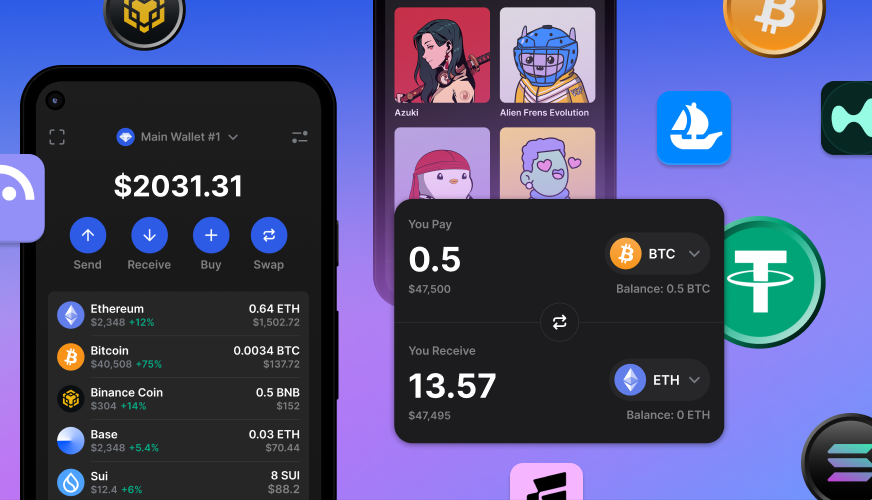
So you’ve heard about Bitcoin, Ethereum, or maybe even Dogecoin—and now you’re wondering: “How do I actually store this stuff?” The answer is simple: you need a crypto wallet. But don’t worry—it’s not a leather pouch or a physical vault. A crypto wallet is a digital tool that lets you securely store, send, and receive cryptocurrencies. Think of it like your online bank account, but instead of dollars, it holds digital coins and tokens.
Unlike traditional banks, crypto wallets don’t “hold” your money in the usual sense. Instead, they manage the cryptographic keys—private and public—that prove ownership and allow transactions on the blockchain. Whether you’re buying your first Bitcoin or just curious about how digital money works, understanding crypto wallets is the essential first step. This guide breaks it all down in plain English, with zero jargon overload.
Types of Crypto Wallets: Hot vs. Cold Storage
Not all crypto wallets are created equal. They fall into two main categories: hot wallets and cold wallets. The difference? Connectivity.
Hot Wallets: Fast, Convenient, and Online
Hot wallets are connected to the internet. They’re perfect for everyday use—like buying coffee with crypto or trading on exchanges. Because they’re always online, they’re quick and user-friendly.
- Mobile wallets: Apps like Trust Wallet or MetaMask that live on your phone.
- Web wallets: Browser-based platforms like Coinbase Wallet or Blockchain.com.
- Desktop wallets: Software installed on your computer, such as Exodus or Electrum.
Pros: Easy access, great for small amounts, ideal for beginners.
Cons: More vulnerable to hacks since they’re online.
Cold Wallets: Offline and Ultra-Secure
Cold wallets store your private keys offline, making them nearly impossible to hack remotely. They’re the Fort Knox of crypto storage—best for long-term holders or large amounts.
- Hardware wallets: Physical devices like Ledger Nano X or Trezor Model T. Plug them into your computer only when needed.
- Paper wallets: A printed copy of your public and private keys (less common today due to usability issues).
Pros: Maximum security, immune to online attacks.
Cons: Less convenient for frequent transactions, can be lost or damaged if not backed up.
How Do Crypto Wallets Actually Work?
Here’s where things get interesting—and a little technical, but we’ll keep it simple. Your crypto wallet doesn’t “store” coins like a piggy bank. Instead, it holds two critical pieces of information: your public key and your private key.
Public Key = Your Wallet Address
Think of your public key as your email address or bank account number. You can share it freely so others can send you crypto. For example:
1A1zP1eP5QGefi2DMPTfTL5SLmv7DivfNa
(This is actually the first Bitcoin address ever created!)
Private Key = Your Secret Password
Your private key is like the PIN to your debit card—but way more powerful. It’s a long string of letters and numbers that proves you own the crypto linked to your public address. Never share this with anyone. If someone gets your private key, they own your funds—forever.
When you send crypto, your wallet uses the private key to “sign” the transaction, proving it’s really you. The network then verifies it using your public key. No middlemen. No banks. Just math and trustless technology.
Setting Up Your First Crypto Wallet: A Step-by-Step Guide
Ready to get your hands on your first wallet? Here’s how to do it safely and correctly—even if you’ve never touched crypto before.
Step 1: Choose the Right Wallet Type
Ask yourself:
– Will I use crypto daily? → Go with a hot wallet.
– Am I investing for the long term? → Consider a cold wallet.
Beginners often start with a mobile or web wallet for simplicity. Trust Wallet and MetaMask are excellent choices for new users.
Step 2: Download or Access the Wallet
For mobile: Download from the official app store (Google Play or Apple App Store).
For web: Visit the official website—never click links from emails or social media.
⚠️ Warning: Fake wallet apps and phishing sites are rampant. Always double-check URLs and developer credentials.
Step 3: Create Your Wallet
You’ll be asked to set a password and—most importantly—write down a recovery phrase (also called a seed phrase). This is usually 12 or 24 random words.
Example:
apple banana cloud dream echo forest grape hill ice juice kite lemon
This phrase is your master key. If you lose your phone or forget your password, this phrase can restore your wallet. Store it offline—on paper, in a safe, or engraved on metal. Never take a photo or store it digitally.
Step 4: Fund Your Wallet
Now you’re ready to receive crypto! Share your public address (or scan the QR code) with someone sending you funds—or buy crypto through an exchange like Coinbase or Binance and transfer it to your wallet.
Security Tips Every Beginner Must Know
Crypto is revolutionary—but it’s also a target for scammers. Protect yourself with these non-negotiable rules:
- Never share your private key or seed phrase. Legitimate companies will never ask for it.
- Use two-factor authentication (2FA) on all accounts linked to your wallet.
- Keep software updated. Wallet apps and hardware devices release security patches regularly.
- Beware of phishing scams. Fake websites mimic real wallets to steal your info. Always type URLs manually.
- Test with small amounts first. Before sending large sums, send a tiny test transaction to confirm everything works.
Remember: In crypto, you are your own bank. That means you are responsible for security. No customer support will refund stolen funds.
Common Myths About Crypto Wallets—Busted
Misinformation spreads fast in the crypto world. Let’s clear up some major misconceptions:
Myth 1: “My crypto is stored in the wallet.”
False. Your coins live on the blockchain. The wallet just holds the keys to access them. Lose the keys? You lose access—even though the coins still exist on the network.
Myth 2: “Hardware wallets are unhackable.”
Not quite. While they’re far more secure than hot wallets, they’re not invincible. Physical theft, supply chain attacks, or user error (like entering your seed phrase on a compromised computer) can still lead to loss.
Myth 3: “All wallets support all cryptocurrencies.”
Nope. Some wallets only support Bitcoin. Others handle hundreds of coins. Always check compatibility before transferring funds. Sending Ethereum to a Bitcoin-only wallet? Your coins could be gone forever.
Best Crypto Wallets for Beginners in 2024
With so many options, which wallet should you pick? Here are our top picks based on ease of use, security, and support:
- MetaMask: Best for Ethereum and DeFi apps. Browser extension + mobile app. Great for interacting with decentralized platforms.
- Trust Wallet: Mobile-first, supports 1M+ assets, backed by Binance. Simple interface for newcomers.
- Ledger Nano X: Top-tier hardware wallet. Bluetooth-enabled, supports 5,500+ coins. Ideal for serious investors.
- Exodus: Sleek desktop/mobile wallet with built-in exchange. Beginner-friendly with live customer support.
Pro tip: Start with a free hot wallet to learn the ropes. Once you’re comfortable and holding larger amounts, upgrade to a hardware wallet.
Key Takeaways: What Every Beginner Should Remember
- A crypto wallet manages your public and private keys—it doesn’t store coins physically.
- Hot wallets are convenient for daily use; cold wallets offer maximum security for long-term storage.
- Your seed phrase is your lifeline—write it down, store it offline, and never share it.
- Security is your responsibility. Enable 2FA, avoid phishing, and test transactions with small amounts.
- Choose a wallet that matches your needs: mobile for convenience, hardware for safety.
FAQ: Your Most Common Crypto Wallet Questions
Q: Can I lose my crypto if I lose my phone?
A: Only if you didn’t back up your seed phrase. If you have the recovery phrase, you can restore your wallet on a new device. Without it? Your funds are likely gone forever.
Q: Are crypto wallets free?
A: Most software wallets are free to download and use. Hardware wallets cost money (typically $50–$200), but they’re a small price for serious security.
Q: Can I have more than one crypto wallet?
A: Absolutely! Many users have multiple wallets—one for trading, one for savings, and one for DeFi projects. Just remember to back up each one properly.
Final Thoughts: Your Crypto Journey Starts Here
Getting started with crypto doesn’t have to be intimidating. At its core, a crypto wallet is simply a tool that gives you control over your digital assets—no banks, no gatekeepers, just you and your keys. Whether you’re buying your first fraction of Bitcoin or exploring decentralized finance, your wallet is the gateway.
Start small, stay secure, and never stop learning. The world of cryptocurrency is evolving fast, and now—thanks to your new wallet—you’re part of it.